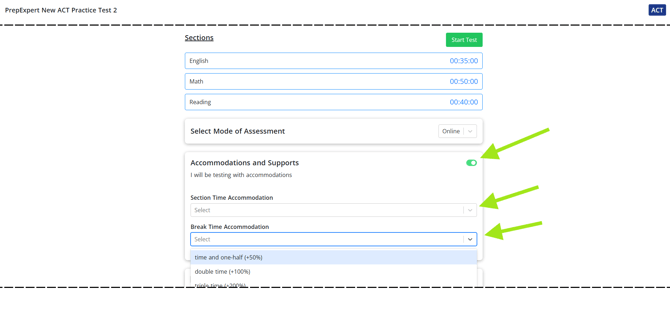
Accommodations can be added to SAT and ACT practice tests directly from the Prep Expert Student Dashboard before starting the test.
- Open the practice test you would like to take.
- Before clicking Start Test, locate the Accommodations and Supports section.
- Turn on the I will be testing with accommodations toggle.
- Select the appropriate Section Time Accommodation.
- Select the appropriate Break Time Accommodation, if needed.
- Once your accommodations are selected, click Start Test.
Your selected accommodations will automatically be applied to the practice test.
Accommodations must be selected before starting the practice test. Be sure to review your settings before clicking Start Test.